Browse visually
Persistent thumbnails replace cryptic filenames with models you can recognize.
Free & open-source desktop app
Volum turns folders full of STL, 3MF, OBJ, and STEP files into a visual, searchable project library. Index existing folders in place, or choose a managed home for projects you want Volum to own.
Version 0.3.0macOS, Windows & Linux
A library above your folders
Point Volum at the folders you already use. It creates previews in the background, groups related files into projects, and keeps watching as your library changes.
Persistent thumbnails replace cryptic filenames with models you can recognize.
Find projects by name, folder, format, tags, notes, dates, or saved searches.
Keep linked folders authoritative, or opt into a managed library for uploads, renames, Trash, and restore.
Printable files, source geometry, plates, versions, notes, costs, and attribution stay together as one project.
Complete print projects
Volum understands the difference between a loose mesh and a print project. Related files can live together while each format keeps the details that make it useful.
Inspect plates, objects, printer, nozzle, layer height, profile, colors, print time, and explicit sliced grams.
OpenCascade-backed metadata, interactive tessellation, thumbnails, and geometry analysis work across every supported platform.
Bundle source geometry, printable exports, plates, and versions. Choose the primary preview, split a bundle, or merge projects manually.
Quietly capable
Interactive viewer
Orbit, zoom, reset, and jump between standard views. Multi-part projects keep their arrangement and material colors.
Smart collections
Combine all/any rules for text, location, tags, formats, dates, dimensions, geometry, and project state—or keep a collection manual.
Backup & restore
Create validated, checksummed ZIP backups locally, on a mounted NAS, or over WebDAV—with schedules, retention, history, and safe restore.
Materials & cost
Save material prices, use trustworthy 3MF filament data, calculate per-piece and batch costs, and keep estimates with the project.
Live indexing
Watch changes in the background, pause or resume preview building, recognize moved files, and reconnect unavailable drives without losing metadata.
Also included
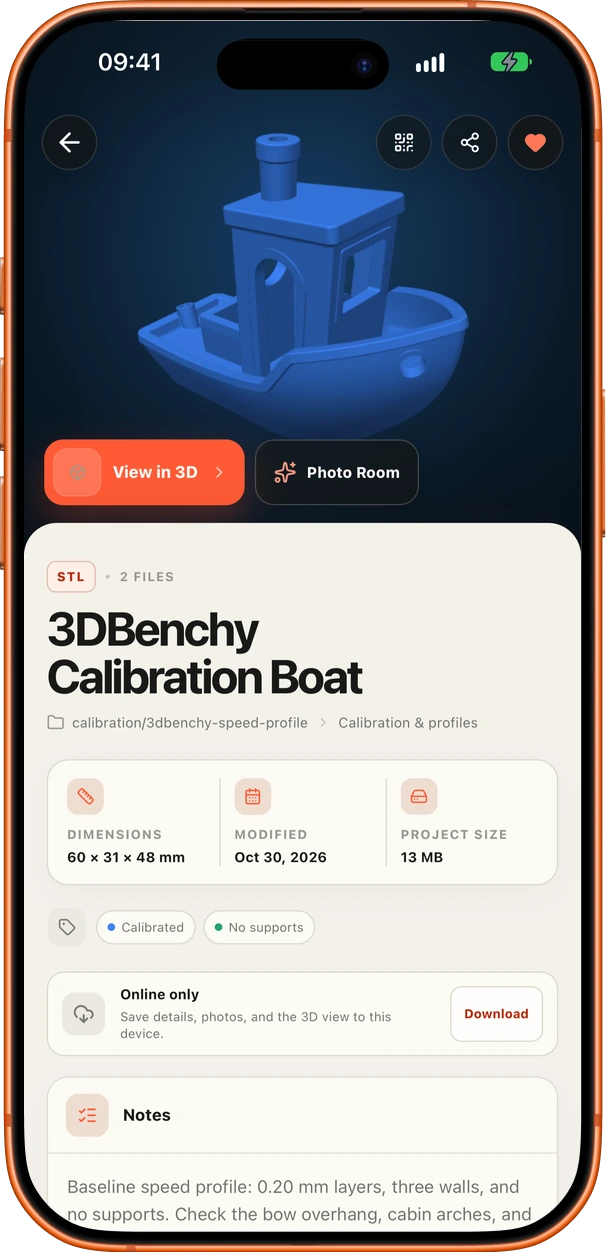
Keep dimensions, file size, modification date, surface area, volume, and triangle count beside the interactive preview.
Use recents, favorites, folders, quick filters, saved searches, sorting, and three grid densities to return to the right project.
Select several projects to favorite, tag, add to a manual collection, or bundle together in one action.
Open a file in a configured slicer or its system default, then reveal it in Finder, Explorer, or your Linux file manager.
Validate an archive before restore, make a safety backup first, browse backup history, and retry scheduled destinations when they return.
Use English, Catalan, or Spanish; choose light, dark, or system themes; navigate by keyboard; and approve signed updates yourself.
Volum Companion · Early access
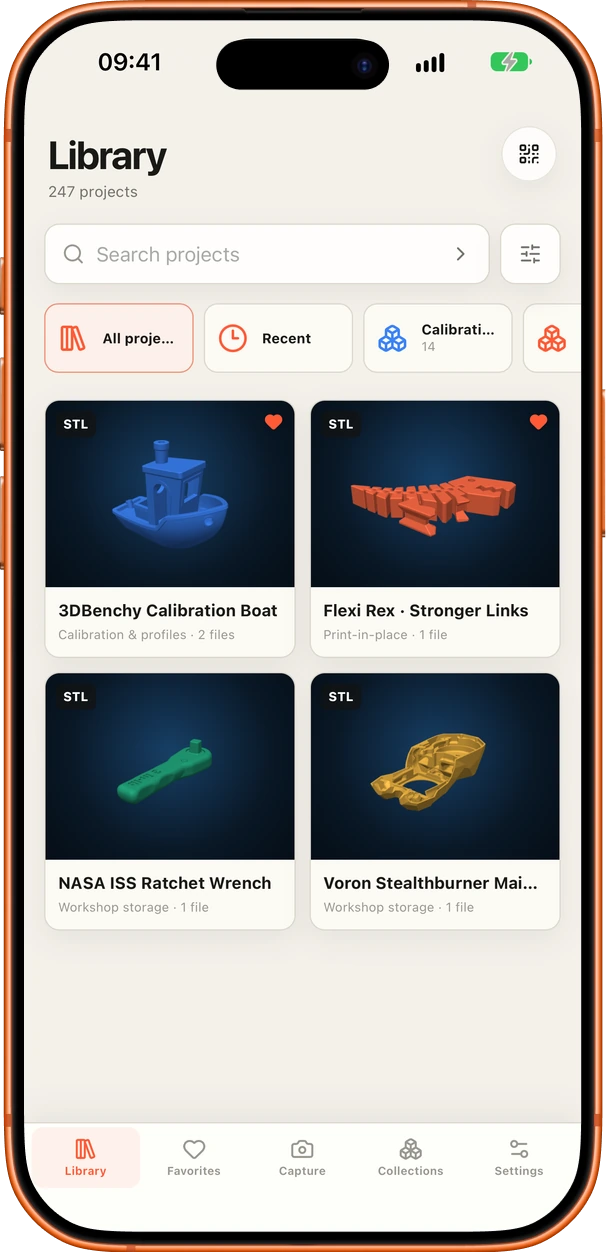
Connect directly to your Desktop host or volumd server to browse the workshop library. Then turn a project into a polished photo or animated turntable without sending it to a cloud rendering service.
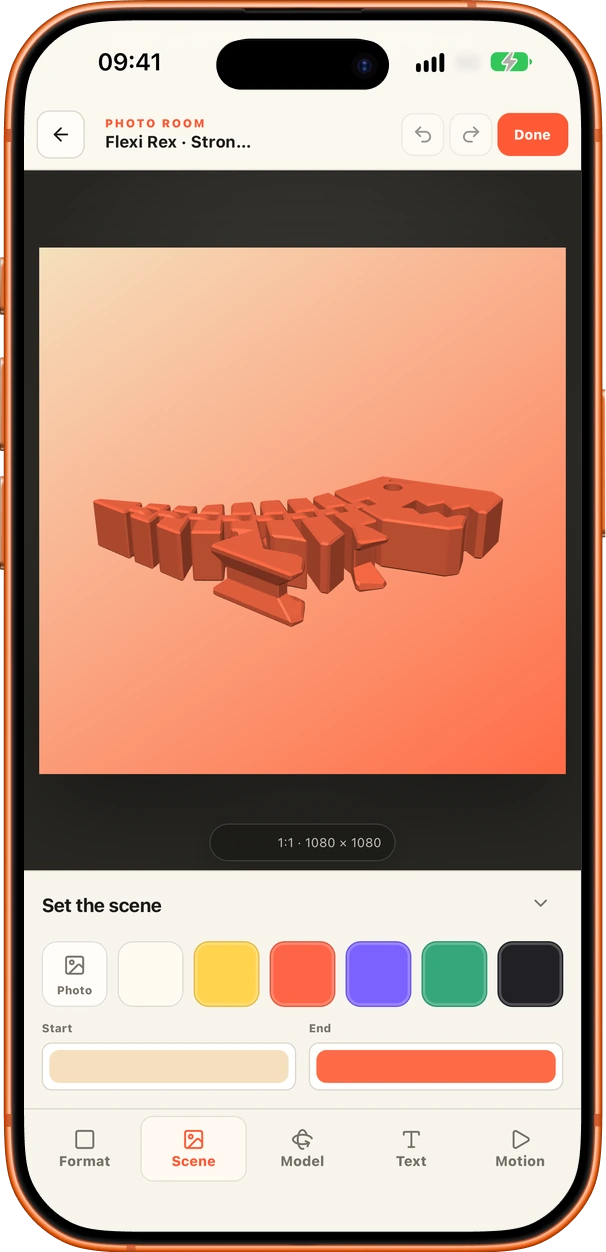
Switch between Square, Portrait, Landscape, and Reel / Story from a dedicated Format control.
Choose a background, position and rotate the model, add text, or create a smooth model animation.
Render a JPEG and open the phone’s Share / Save sheet immediately. Videos remain an explicit export.
Geometry-aware duplicates
Volum separates exact copies from matching geometry. It can recognize the same model across formats and orientations, then helps you choose a keeper without silently deleting anything.
MakerWorld & Printables
Paste a public model URL to save its title, creator, description, thumbnail, and official source link. Attach the files you downloaded without sharing credentials or bypassing protected downloads.
One library, three setups
The simplest start: one computer owns the database and indexes linked folders or a managed library directly.
Keep the existing Desktop canonical and enable Mobile access for trusted phones, tablets, or another Desktop.
volumdMove to an always-on NAS or home server when several trusted devices need one managed library. Server workflows are in early access.
Backup & restore
Volum protects the work around your model library—collections, tags, notes, estimates, settings, attribution, and saved media—without copying or replacing your original 3D files.
Volum data, preferences, attribution, and user-owned media
Original STL, 3MF, OBJ, STEP, or STP model files
Checksums, structure, and bounded contents are verified before restore begins.
Volum makes a safety backup of its existing app data before replacing anything.
The app restarts into the restored library, and folders that moved can be reconnected without losing metadata.
0
Hosted cloud required
Volum is local-first by design. The apps have no account, application analytics, hosted model cloud, or public relay. No connection is required to browse locally; optional remote clients connect directly to the canonical host you choose.
This website uses session-scoped PostHog analytics to understand visits and interactions. Website analytics are separate from the Volum app and never receive library, model, or file data. PostHog privacy
Free desktop app
No account, trial, subscription, or model limit. Choose your platform and point Volum at a folder.
Desktop application
A universal build for Apple silicon and Intel Macs.
Desktop application
A portable AppImage for x86_64 distributions, plus an Arch Linux package.
Desktop application
Native installers for Windows 10 and 11 on x64 and ARM64.
All releases, checksums, and updater signatures are published on GitHub Releases
Free mobile companion
Browse your private library, capture workshop photos, and keep selected projects available offline from your phone or tablet.
Mobile companion
Install the signed Volum Companion APK directly on a supported Android device.
Mobile companion
Install Volum Companion through Apple TestFlight and receive beta updates automatically.
The mobile app connects directly to Volum Desktop or your own volumd server. Read the mobile installation guide
Voluntarily supported
Volum is open source and will stay free. If it saves you time, you can support continued development with a tip on Ko-fi.
Useful answers
Yes. There is no trial, subscription, account, or model limit. Volum is licensed under GPL-3.0-or-later, and its source code and releases are public on GitHub.
Linked folders are indexed in place and remain authoritative. In an optional managed library, Volum moves or renames files only after an explicit action so it can support uploads, Trash, and restore.
STL, OBJ, 3MF, and STEP/STP projects have generated previews and interactive geometry. STEP/STP support uses OpenCascade for metadata, tessellation, thumbnails, and geometry analysis.
Volum never cleans up automatically. It separates exact files from geometry matches, recommends a keeper, preserves companion files and organization metadata, and uses the operating system Trash when you approve cleanup.
No connection is required to browse a local library. Network access is used only for features you enable, such as updates, configured remote backups, public MakerWorld or Printables metadata, or direct access from paired devices.
No. Volum has no hosted model cloud. Files and previews stay on your canonical Desktop or server; optional paired clients upload directly to a managed library on that host.
Volum uses stable file fingerprints to recognize moved files and keeps metadata while removable or mounted libraries are unavailable. You can reconnect an offline library at a new path without rebuilding your organization.
A portable, checksummed ZIP containing Volum’s organization, settings, attribution, and user-owned media. It never includes or replaces original STL, 3MF, OBJ, STEP, or STP files. Archives are validated before restore, and Volum first makes a safety backup of its current data.
No. Volum reads public MakerWorld or Printables metadata and lets you attach files you downloaded through the official provider. It never asks for provider credentials.

Your files are already the library
Download Volum, choose a folder, and start browsing. Nothing to migrate, upload to a hosted cloud, or subscribe to.
Desktop for macOS, Linux, and Windows · Companion for Android and iOS · Version 0.3.0